We are going to use 2 switches, a 2‑position switch T and a 3‑position switch S that gives 6 combinations.
We have to know that the RC sends values in µs (microseconds) but we work with %. In Ardupilot "Mission Planner", there are 6 different ranges defined:
1000–1230 ; 1231–1360 ; 1361–1490 ; 1491–1620 ; 1621–1749 ; 1750+
To cover the whole range (1000–2000), each % corresponds to 5 µs because the range of the switches varies from –100% to +100%.
Therefore, (2000−1000)/(100−(−100)) = 5 µs
From there we can calculate the mid‑point of each range and its corresponding value in %. (See table below)
| Switch position | Range in microsec | Mid-Range in microsec | Mid-Range in % | min range in % | max range in % |
| S = up T = up |
1000-1230 | 1115 | -77 | -100 | -54 |
| S = up T = down |
1231-1360 | 1296 | -41 | -54 | -28 |
| S = middle T = up |
1361-1490 | 1426 | -15 | -28 | -2 |
| S = middle T = down |
1491-1620 | 1556 | 11 | -2 | 24 |
| S = down T = up |
1621-1749 | 1685 | 37 | 24 | 50 |
| S = down T = down |
1750-2000 | 1875 | 75 | 50 | 100 |
The values to aim for are in the column 4. You can calculate them manually but it’s tedious… or you can use a python script.
import numpy as np
def solve_weight_offset(raw_values, target_values): """ Solve for weight and offset using least squares fit. raw_values: list of raw switch outputs (e.g. [-100, 0, 100]) target_values: list of desired outputs (same length) """ A = np.vstack([np.array(raw_values)/100, np.ones(len(raw_values))]).T w, o = np.linalg.lstsq(A, target_values, rcond=None)[0] return round(w), round(o)
def main(): print("Enter six target outputs (space separated):") targets = list(map(int, input().split())) if len(targets) != 6: print("Please enter exactly six values.") return
# Split into SA base levels and SB offsets # Assumes order: SA↑+SB↑, SA↑+SB↓, SA—+SB↑, SA—+SB↓, SA↓+SB↑, SA↓+SB↓ target_SA = [targets[0], targets[2], targets[4]] # base levels target_SB = [0, targets[1] - targets[0]] # offset difference
# Raw switch values raw_SA = [-100, 0, 100] raw_SB = [-100, 100]
# Solve weights/offsets w_SA, o_SA = solve_weight_offset(raw_SA, target_SA) w_SB, o_SB = solve_weight_offset(raw_SB, target_SB)
print("\nCalculated mixer parameters:") print(f"SA line → Weight: {w_SA}, Offset: {o_SA}") print(f"SB line → Weight: {w_SB}, Offset: {o_SB}")
# Show combined outputs outputs = [] for sa_raw in raw_SA: for sb_raw in raw_SB: sa_val = (sa_raw * w_SA) / 100 + o_SA sb_val = (sb_raw * w_SB) / 100 + o_SB outputs.append(round(sa_val + sb_val)) print("\nCombined outputs (approx):", outputs)
if __name__ == "__main__": main()
All in one, these are the values I entered in the RC:
3‑pos switch (SA): Weight: 57%, Offset: -1%
2‑pos switch (SE): Weight: 17%, Offset: 0%
The values calculated by the script are slightly different but they will work.
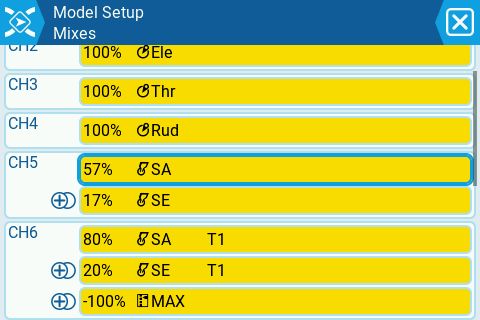
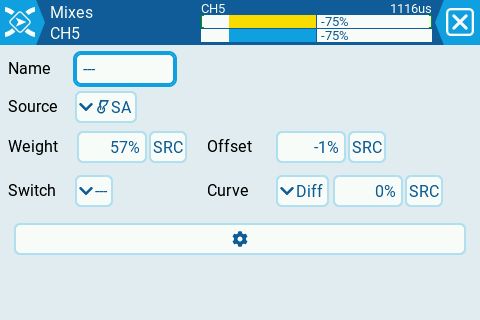
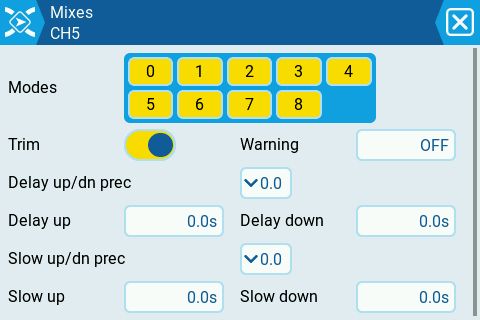
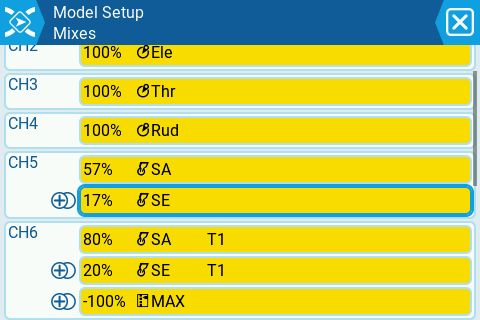
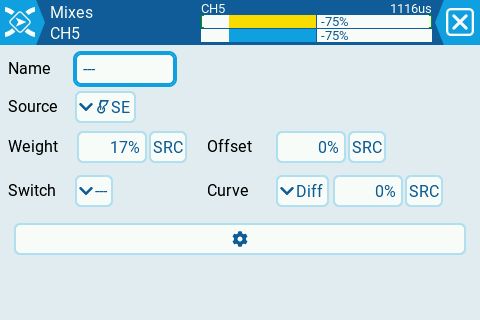
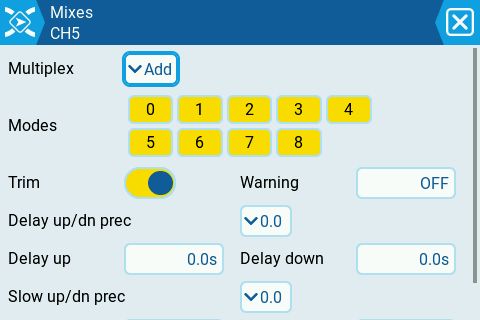
You should verify you got the right timings by flipping your 2 switches. Then, in "Mission Planner", you assign whatever flight modes you want.
Happy flying